UE中使用NDI插件读取Qt程序截图
一、下载和安装NDI工具和SDK
下载和安装:
1.NDI 6 SDK (https://ndi.video/for-developers/ndi-sdk/)
2.NDI 6 Tools(选装) (https://ndi.video/)
3.NDI SDK for Unreal Engine v3.8 (https://ndi.video/for-developers/ndi-unreal-engine-sdk/)
二、Qt程序使用NDI发送视频流
1.新增SDK到工程目录下 \HDD\NDISDK
2.XXX.pro 文件加入:
1 | #NDI |
3.mainform.h文件:
1 |
|
4.mainform.cpp文件:
(1)构造函数:
1 | /*--------------NDI--------------------*/ |
(2)析构函数:
1 | /*--------NDI----------*/ |
(3)captureAndSendFrame函数:
1 | /* NDI 定时发送 */ |
以上执行后,可用NDI tools工具测试是否正常send视频流
三、使用UE5接收视频流并播放
1.添加NDI Receive Actor播放实体
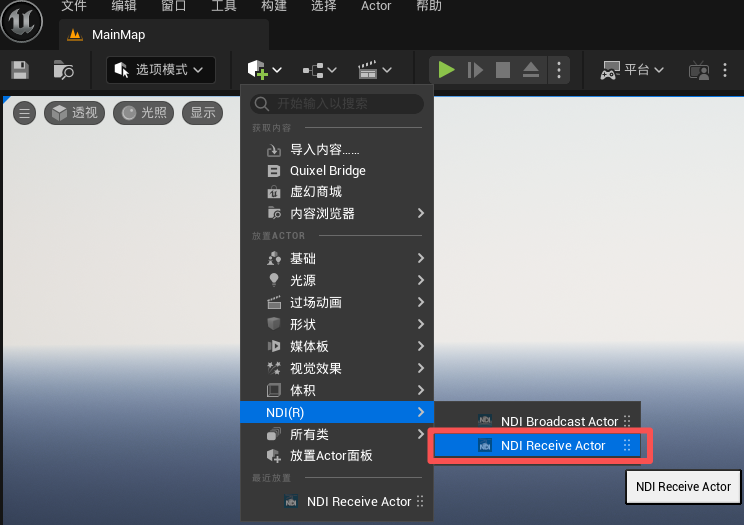
2.添加NDI Media Receiver,用来接收视频流

3.设置创建的NDIMediaReceiver,将Connection选择为Qt程序中的SourceName、MachineName、StreamName

4.设置NDI Receive Actor的视频源为创建的NDIMediaReceiver

以上,可在UE5中正常播放Qt程序截图
本博客所有文章除特别声明外,均采用 CC BY-NC-SA 4.0 许可协议。转载请注明来源 易锦风的博客!
相关推荐
2026-07-04
FBX转3DTiles:高效WebGIS数据转换指南
1.3D Tiles格式介绍 FBX是常见的三维模型交换格式,而3DTiles是专为WebGIS优化的流式三维数据标准。将FBX转换为3DTiles可显著提升三维数据在Web端的加载效率与渲染性能,尤其适用于大范围场景的轻量化展示。 3D Tiles是一个开放的规范,用于传输海量的异构三维地理空间数据集。使用概念上类似于 terrain和imagery的瓦片流技术,3D Tiles使得建筑物数据集、BIM模型、点云和摄影测量模型等大模型比较流畅的在Web端进行浏览展示。 2.3D Tiles支持的人工模型类型 人工建模:数据来源于 3dmax、Maya 等建模软件建模,建好的三维模型导出为 dae 和 obj 数据。 BIM 模型:数据来源于专业的 BIM 软件,常见的有 rvt 和 dgn 格式。 点云数据:一般是激光扫描后生产的数据,有 las、pts、ply 等格式。 3.FBX转换3D Tiles格式方式 将FBX模型转换为3D Tiles的核心路径是“FBX → glTF/GLB → 3D Tiles...
2026-06-26
TMS XYZ WMTS的不同
WMS是OGC定义的协议,用于请求任意区域的渲染地图图像。客户可以根据需要以平铺模式对其进行请求。 WMS-C是OSGeo创建的WMS扩展,它向功能文档中添加了元数据,以使客户端知道在哪里发出请求,从而使它们与服务的图块对齐。 WMS-C服务可能会拒绝未与其图块网格对齐的请求。 TMS是OSGeo创建的协议,允许使用整数索引请求图块。它还提供用于发现和配置的元数据。可以将其实现为位于静态文件系统中的一组切片图像和元数据文件。 Y轴从底部向上。 WMTS是OGC创建的协议,允许使用整数索引请求图块。它还提供用于发现和配置的元数据。 Y轴从顶部向下。 “ XYZ”是我们通常用于静态文件系统中用于提供切片服务的各种临时方案的术语。没有标准的元数据机制。尽管最常见的是从顶部向下移动,但对于Y轴方向没有固定的标准。 Google为自己的目的做了某件事,其他人则模仿了它。特定的XYZ客户端和服务器可能会或可能无法一起工作。有时也可以使XYZ客户与TMS或WMTS服务一起使用。 还有一些较少使用的协议,例如Bing“ quadkey”协议或翻转缩放级别顺序的Google...
2026-01-29
UE Async Load Asset通过资源路径动态加载资源
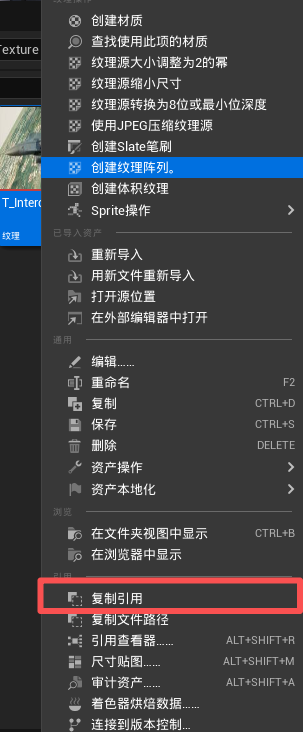
1.复制路径 右键资源复制资源引用 2.蓝图操作 拖出路径转Async Load Asset节点,将Assset拖出到To Soft Object Reference和Make Soft Object 将Path粘贴资源路径中 将Async Load Asset节点拖出的Object,转成想要转换的类型,比如Texture2D,并进行设置,具体如下图:

2025-04-25
UE C++实现第三人称角色基本功能
首先基于Character创建一个角色类,在头文件为其添加弹簧臂和摄像机组件 1234UPROPERTY(VisibleAnywhere, Category = "Comp") class UCameraComponent* CameraComp;UPROPERTY(VisibleAnywhere, Category = "Comp") class USpringArmComponent* SpringComp; 在构造函数中将相关组件创建出来 12345678910111213141516171819202122// 所需要添加的头文件#include "Camera/CameraComponent.h"#include "GameFramework/SpringArmComponent.h"#include "GameFramework/CharacterMovementComponent.h" // 创建摄像机组件 CameraComp =...
2025-10-27
UE Gameplay 框架总结
本文介绍了游戏开发中几个重要的概念:GameInstance用于保存临时全局数据,GameMode管理游戏规则和类信息,DefaultPawn提供基础操作,PlayerController连接客户端与服务器,以及GameState和PlayerState负责全局数据管理和玩家状态同步。 各个模块 GameInstance(游戏实例) 实例里的数据不会随着关卡的切换而消失。 作用是为游戏保存临时的全局数据(并不是所有的全局变量都存在GameInstance中,如玩家的信息应该存在PlayerState,游戏的一些信息存在GameState),或者自定义需要在全局使用的逻辑(慎重,GameInstance 的臃肿会导致卡顿)。 通常情况下一个Game中应该只有一个GameInstance(UE也是提供了多个GameInstance协同的扩展的,但是一次Game只能有一个GameInstance生效) GameInstance的生命周期就是从游戏进程启动到游戏进程结束 ...
2025-04-25
UE 文件目录结构
在最高一级目录中,是你的引擎(Engine)目录以及你的所有游戏项目目录。Engine目录包含引擎自身及其随附工具。每个游戏目录都包含与该游戏有关的所有文件。与先前的引擎版本相比,UE4中的引擎和游戏在目录结构上有了更明显的区分。 根目录 Engine - 包含构成引擎的所有源代码、内容等。 Templates - [创建新项目](Basics/Projects/Browser) 时可用的项目模板集合。 GenerateProjectFiles.bat - 用于创建在Visual Studio中使用引擎和游戏所需的UE4解决方案和项目文件。请参阅 [](ProductionPipelines/BuildTools/UnrealBuildTool/ProjectFilesForIDEs) 以了解详细信息。 UE4Games.uprojectdirs - 辅助文件,帮助引擎找到子目录中的项目。 通用目录 某些子目录在引擎目录和游戏项目目录中都能找到: Binaries - 包含可执行文件或编译期间创建的其他文件。 Build -...
评论
%E5%AD%A6%E4%B9%A0%EF%BC%9AK8S%E5%AE%9E%E6%88%98%E6%A1%88%E4%BE%8B_kubernetes%20%E6%A1%88%E4%BE%8B/fe31cbdc5c6427a41c8a02c4bd278421.png)
%E5%AD%A6%E4%B9%A0%EF%BC%9Apod%E6%A6%82%E5%BF%B5%E5%8F%8A%E7%9B%B8%E5%85%B3%E6%93%8D%E4%BD%9C_kubectl%20%E8%BF%9B%E5%85%A5pod/7b2c22f6722174f5022fe7a9e34dbebd.png)