pycharm无法安装插件显示网络错误无法安装汉化插件
【pycharm】pycharm无法安装插件显示网络错误/无法安装汉化插件(报错:Marketplace plugins are not loaded,Check the internet connection and refresh)
【问题描述】
进行pycharm汉化时,无法安装插件,弹出提示:Marketplace plugins are not loaded,Check the internet connection and refresh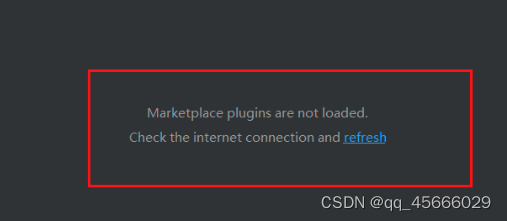
尝试:
百度说在settings-> Appearance&Behavior -> System Settings -> Updats 中,取消勾选Use secre Connections 即可
但是我这个版本没有这个选项
【解决方法】
1、进入file->settings-> Appearance&Behavior -> System Settings -> HTTP Proxy下;
2、勾选 auto-detect proxy seting、automatic proxy configuration URL;
3、将automatic proxy configuration URL其后的网址修改为:https://plugins.jetbrains.com/;
4、保存后重启,即可解决问题。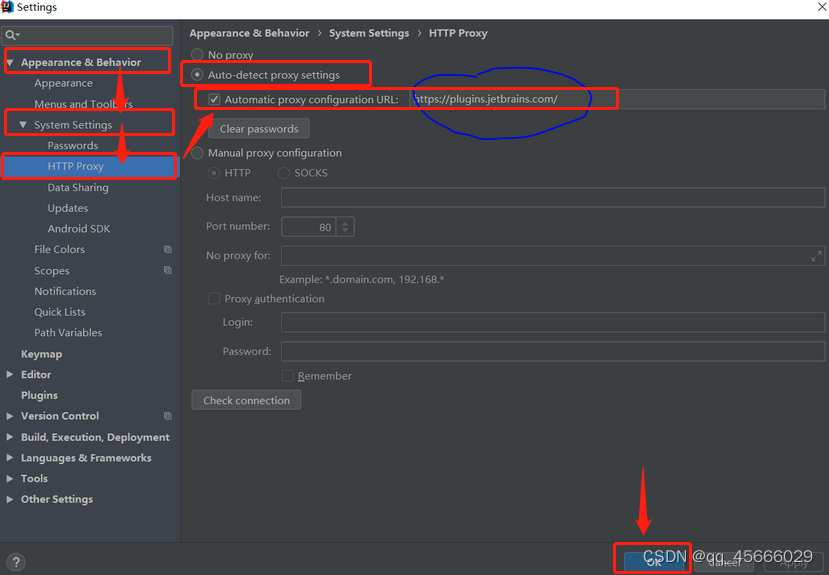
5、再次进行汉化插件搜索时,即可成功搜索到: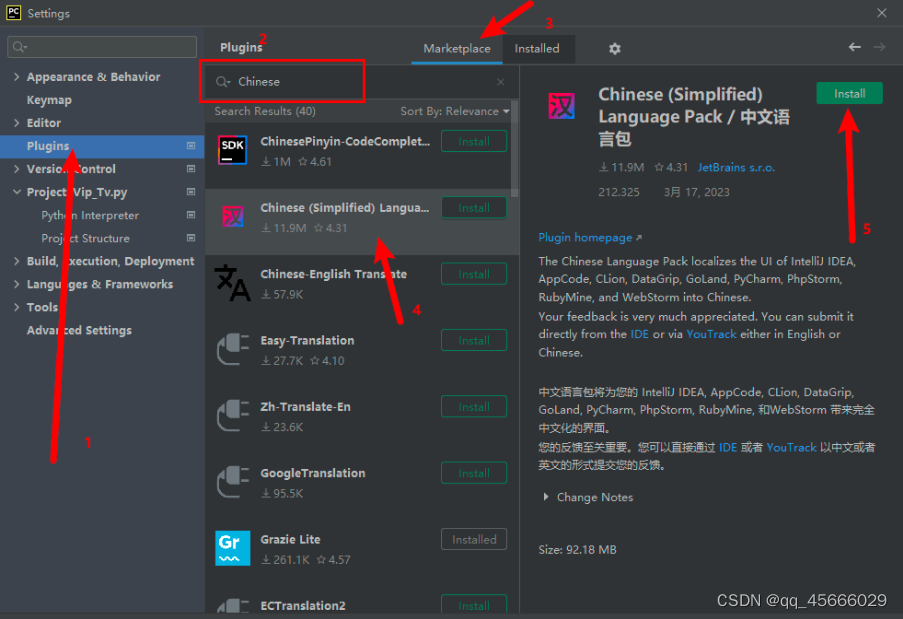
本博客所有文章除特别声明外,均采用 CC BY-NC-SA 4.0 许可协议。转载请注明来源 易锦风的博客!
相关推荐
2025-01-23
Cursor使用介绍
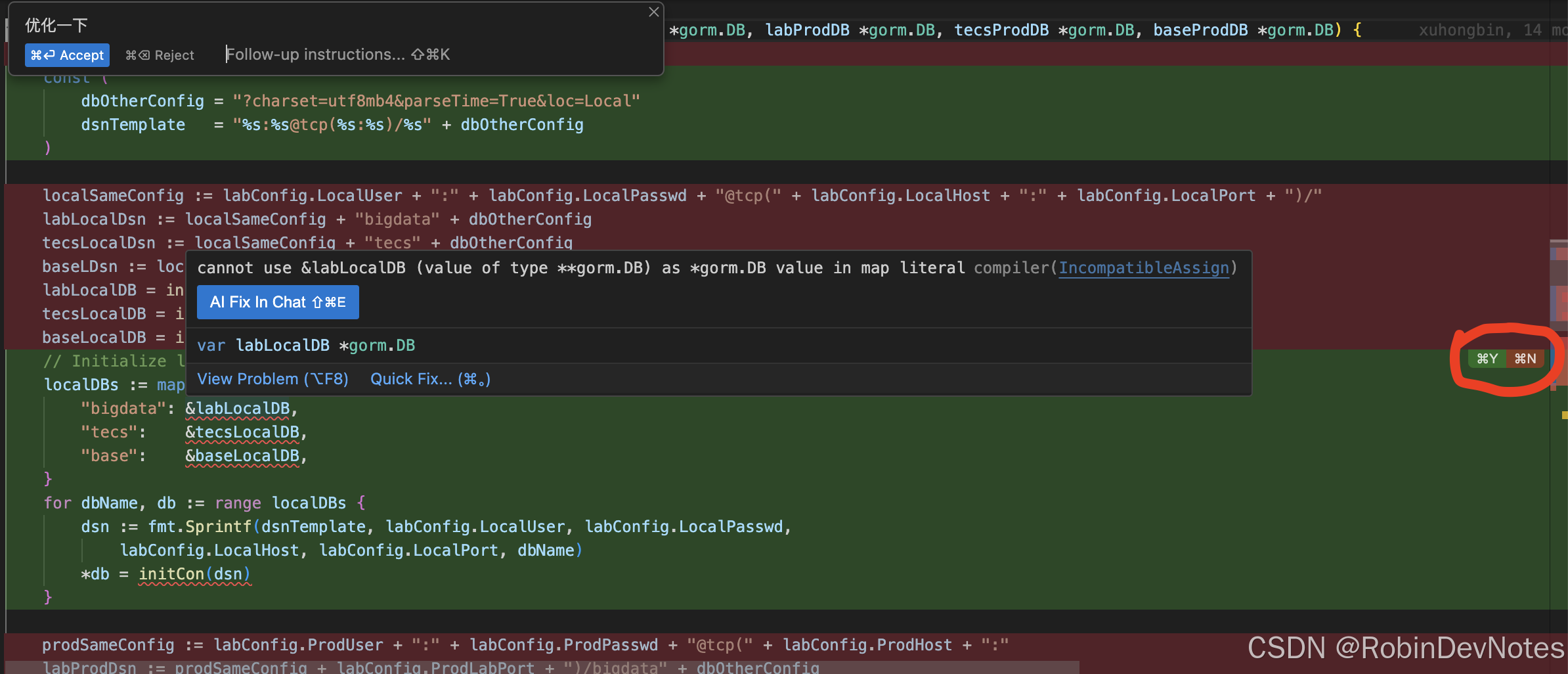
Cursor是一款AI代码编辑器,官网地址为https://www.cursor.com/ 直接在官网下载安装即可,基于VS Code二次开发而来,之所以没有采用插件方式,在官方网站上给出的答案是某些功能插件无法实现,产品专注在使用AI来进行编程方面,价格方面还不便宜,Pro单月20刀,企业版单月单个用户40刀,但某些功能确实好用啊,有找外包替你完成部分工作的感觉,不付费的话使用次数有限制。 最基本功能:Tab键代码自动补全。在写代码时,后面会有代码提示,官网上说是一个更强大的 Copilot(Github出品的代码补全工具),Copilot我只体验过,没有深度使用,不能给出比较准确的对比评价。 第二个特色功能:根据提示修改代码或生成命令。快捷键Ctrl/Cmd + k,比如下图,找到需要优化问题代码片段,选中需要优化一段代码,快捷键Ctrl/Cmd + k,输入提示“优化一下”,就会生成新代码,比较有特色是可以分段部分接受修改,根据右侧图中红框内快捷键操作即可,如果有错误,还可以继续进行AI Fix修复,用来重构代码效率会大大提高。 如果在终端中按快捷键Ctrl/Cmd...

2025-03-25
VS Code秒变AI神器!3步免费部署DeepSeek本地编程助手:代码补全/智能问答/隐私保护全搞定
一、技术选型 以下是VS Code本地部署大模型代码助手的常用插件对比,基于隐私保护、离线使用及功能特性整理,每个人可根据自身需要选择: 插件名称 优点 缺点 适用场景 Continue 支持多模型切换(Ollama/本地模型),支持代码补全/重构/问答,配置灵活度高 需手动修改 JSON 配置文件,新手易出错 企业级复杂项目开发,需同时使用对话和补全功能,重视数据隐私的场景 CodeGPT 一键连接 Ollama 模型,内置 /explain /fix 等快捷指令,学习成本低 仅支持基础问答,代码补全依赖 deepseek-coder 模型 个人开发者快速接入,中小型项目调试,需即时解释代码逻辑的场景 Cline 支持 DeepSeek/Claude 等商用模型,可配置 MCP 服务器扩展功能 需自行购买 API 密钥,部分模型需联网计费 需结合云端高性能模型的混合开发场景,愿意为模型能力付费的团队 Twinny 专为 Ollama...
评论
%E5%AD%A6%E4%B9%A0%EF%BC%9AK8S%E5%AE%9E%E6%88%98%E6%A1%88%E4%BE%8B_kubernetes%20%E6%A1%88%E4%BE%8B/fe31cbdc5c6427a41c8a02c4bd278421.png)
%E5%AD%A6%E4%B9%A0%EF%BC%9Apod%E6%A6%82%E5%BF%B5%E5%8F%8A%E7%9B%B8%E5%85%B3%E6%93%8D%E4%BD%9C_kubectl%20%E8%BF%9B%E5%85%A5pod/7b2c22f6722174f5022fe7a9e34dbebd.png)